
One module for every kind of team work
Most companies juggle several tools to get work done. Developers plan sprints in one app, the maintenance team tracks repairs in a spreadsheet, IT answers requests from a shared inbox, and HR is left exporting employee lists to keep them all in sync.
Project Management brings all of that into SOFFLIX HR. Create a project, choose how the team works, and everyone — from product owners to factory technicians — plans, tracks and closes work with the same employees, departments and permissions you already manage.
Pick a project type that fits the team
Every project starts from a template, and its type decides the views the team gets:
- Scrum — sprints, a backlog, story points and SAFe-style program increments for software and product teams
- Kanban — a continuous-flow board with WIP limits and swimlanes for operations teams such as HR or finance
- Work orders — a ready-made factory maintenance setup: request, approve, assign a technician, close
- Service desk — support tickets with SLA targets and approvals for IT or facilities
- Business project or Blank — start simple and shape it yourself
A short create wizard — Template → Details → People → Review — gets the project live in a minute.
Scrum with sprints and program increments
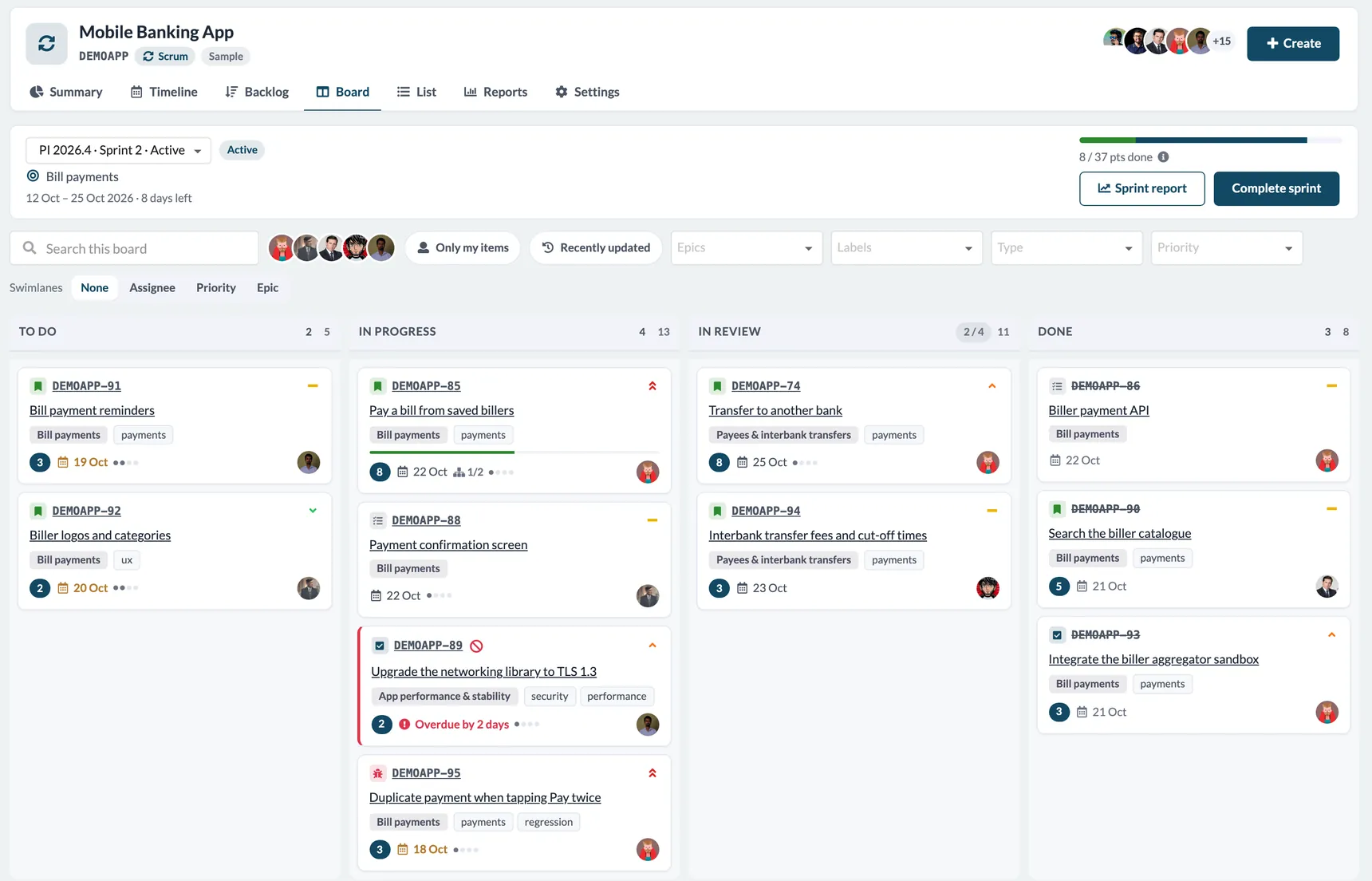
Scrum projects get a familiar, Jira-style experience. The Board shows the active sprint with points done, days left and a one-click sprint report. Cards show the epic, labels, due dates, sub-task progress and blocked or overdue work at a glance, and you can group the board by assignee, priority or epic.
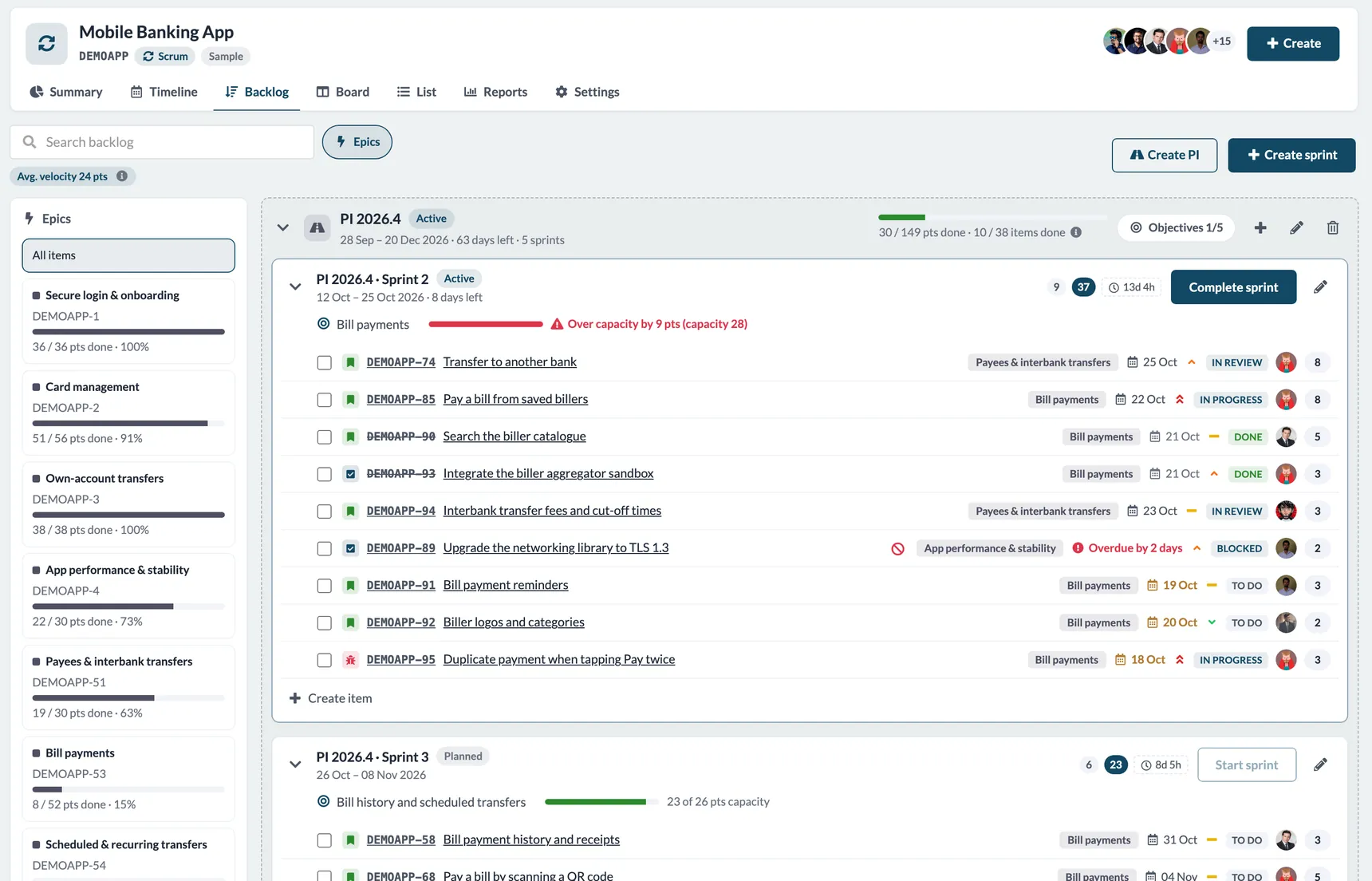
The Backlog goes a step further for teams that plan in quarters. Group sprints into program increments (PIs) with objectives and business value, let SOFFLIX HR create the sprints inside a PI automatically, and get warned when a sprint is over capacity. Epic progress, average velocity and PI roll-ups are always in view.
A timeline everyone can read
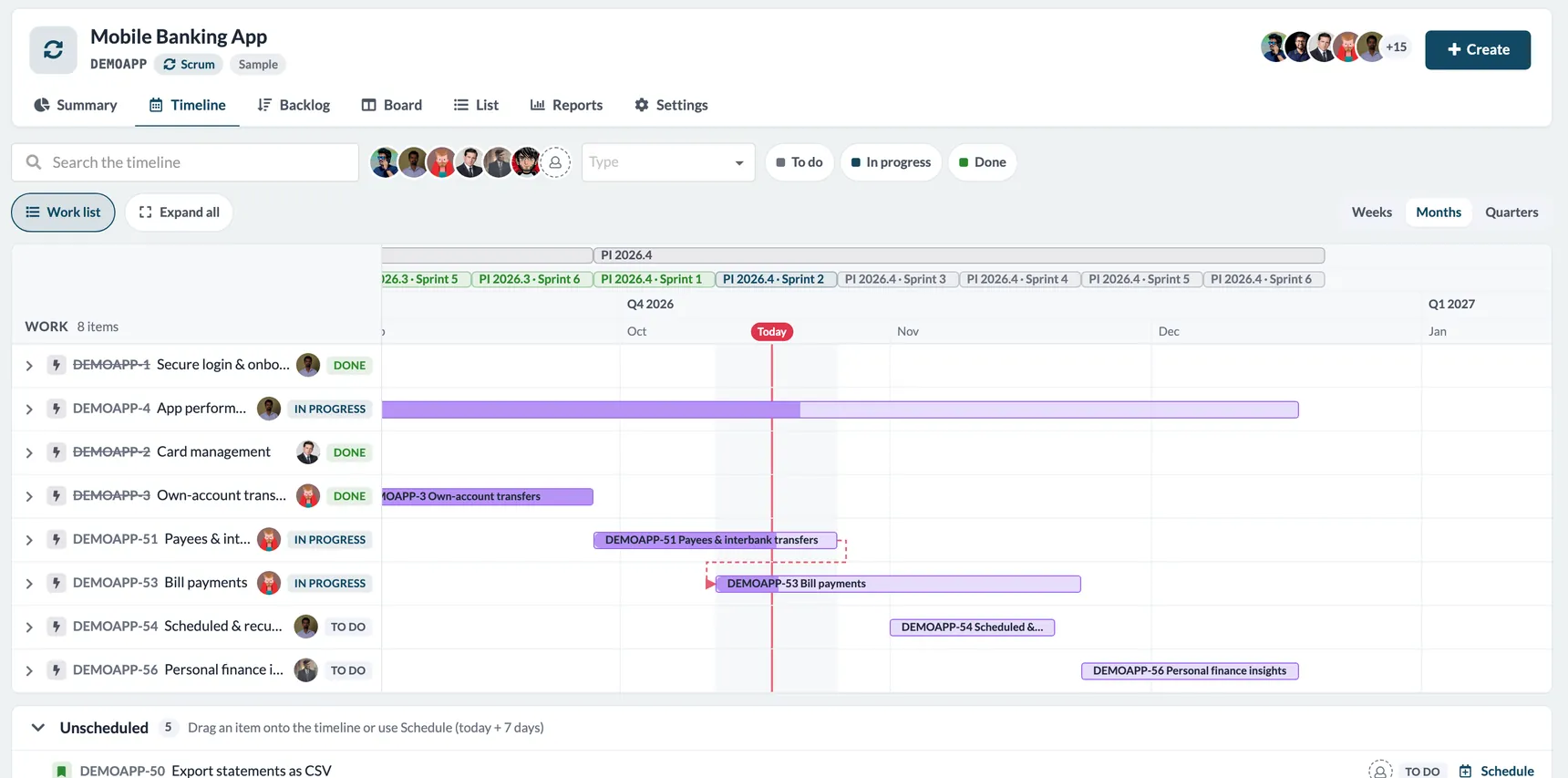
The Timeline turns epics and items into a Gantt chart with sprints and PIs across the top and a clear “Today” marker. Switch between weeks, months and quarters, drag or resize bars to reschedule, and see dependencies between items. Anything without dates waits in an Unscheduled list, ready to be dropped onto the plan.
Work orders for factory maintenance
For plants, warehouses and facilities teams, a Work orders project follows the way maintenance really happens:
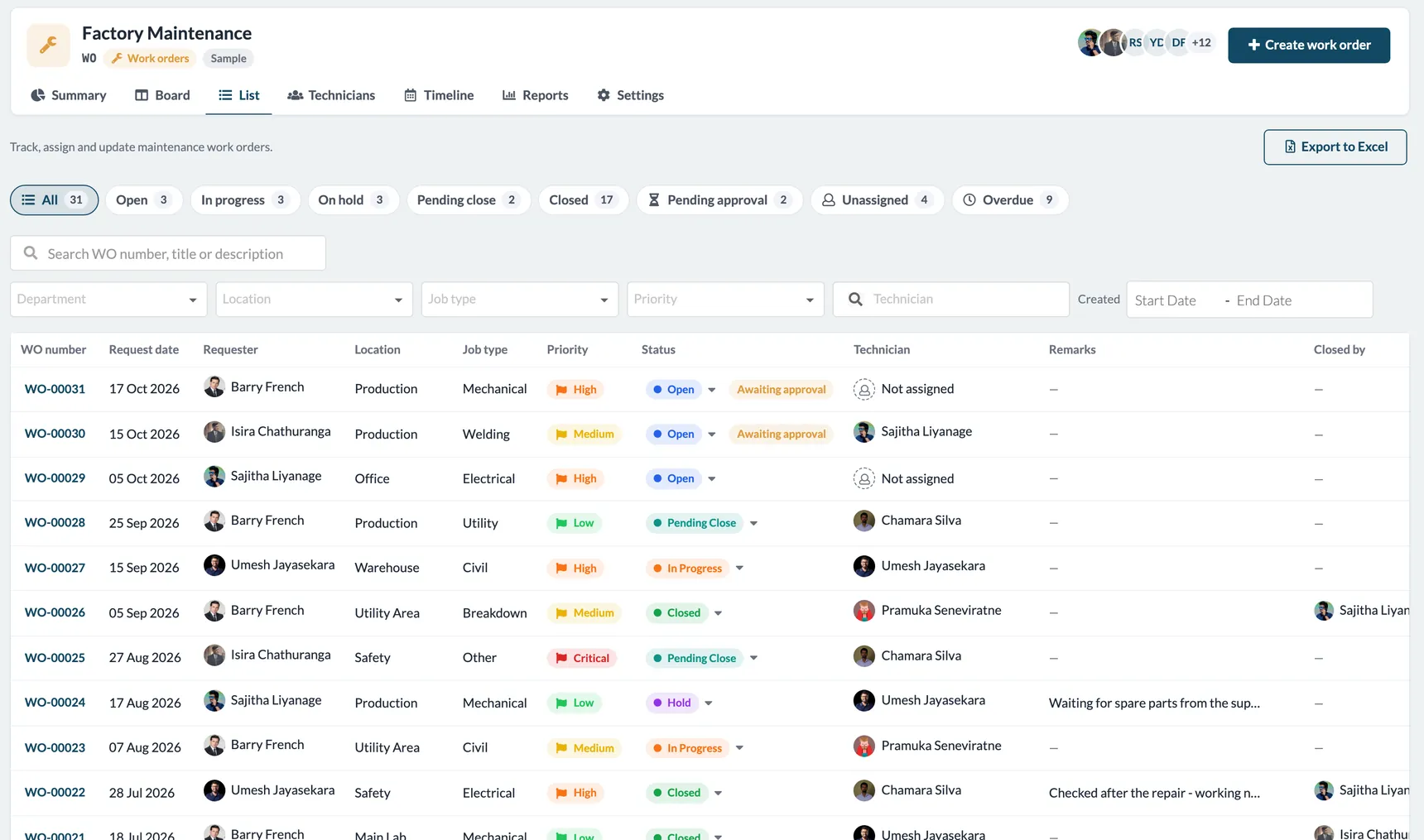
- Request — any employee raises a work order with a location, job type, priority and up to two photos
- Approve — optional approval before work starts
- Assign — an admin picks a technician from the roster
- Work — the technician moves it through In progress or On hold and marks it Pending close
- Close — an admin checks the job, adds remarks and closes it
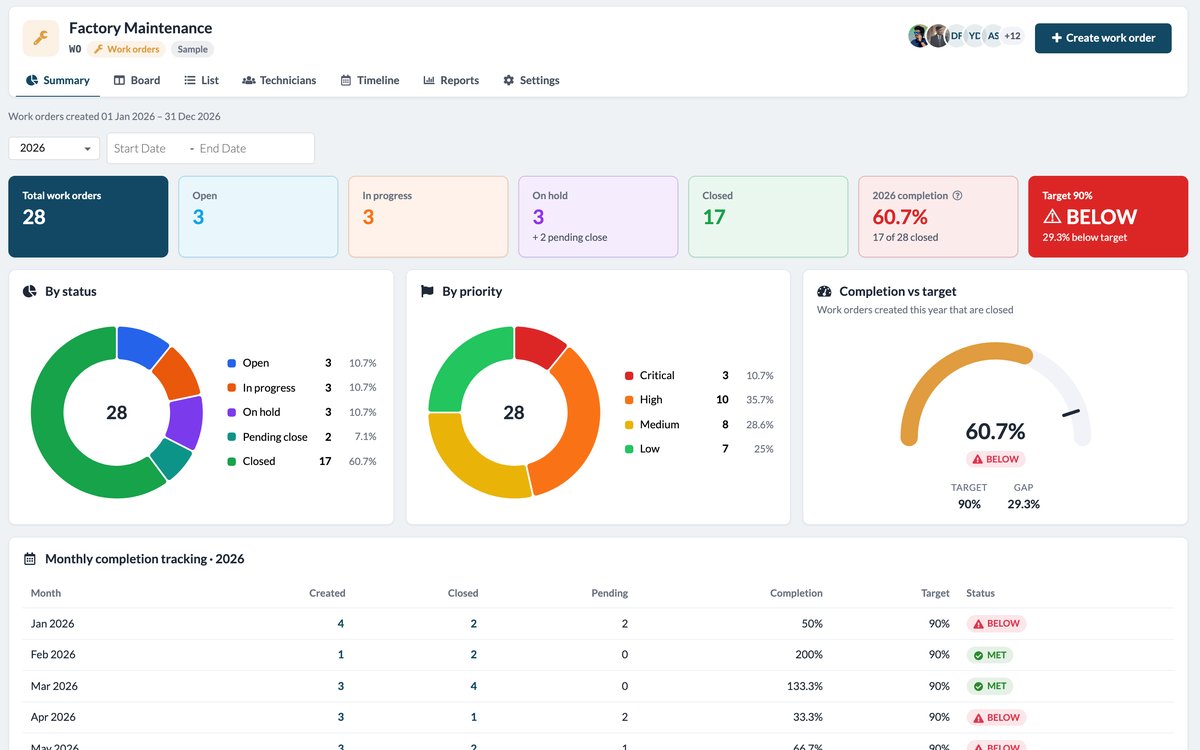
Every order gets a clean, sequential number such as WO-00001. The list view filters by status, department, location, job type, priority, technician and date, highlights orders waiting for approval or still unassigned, and exports to Excel in one click.
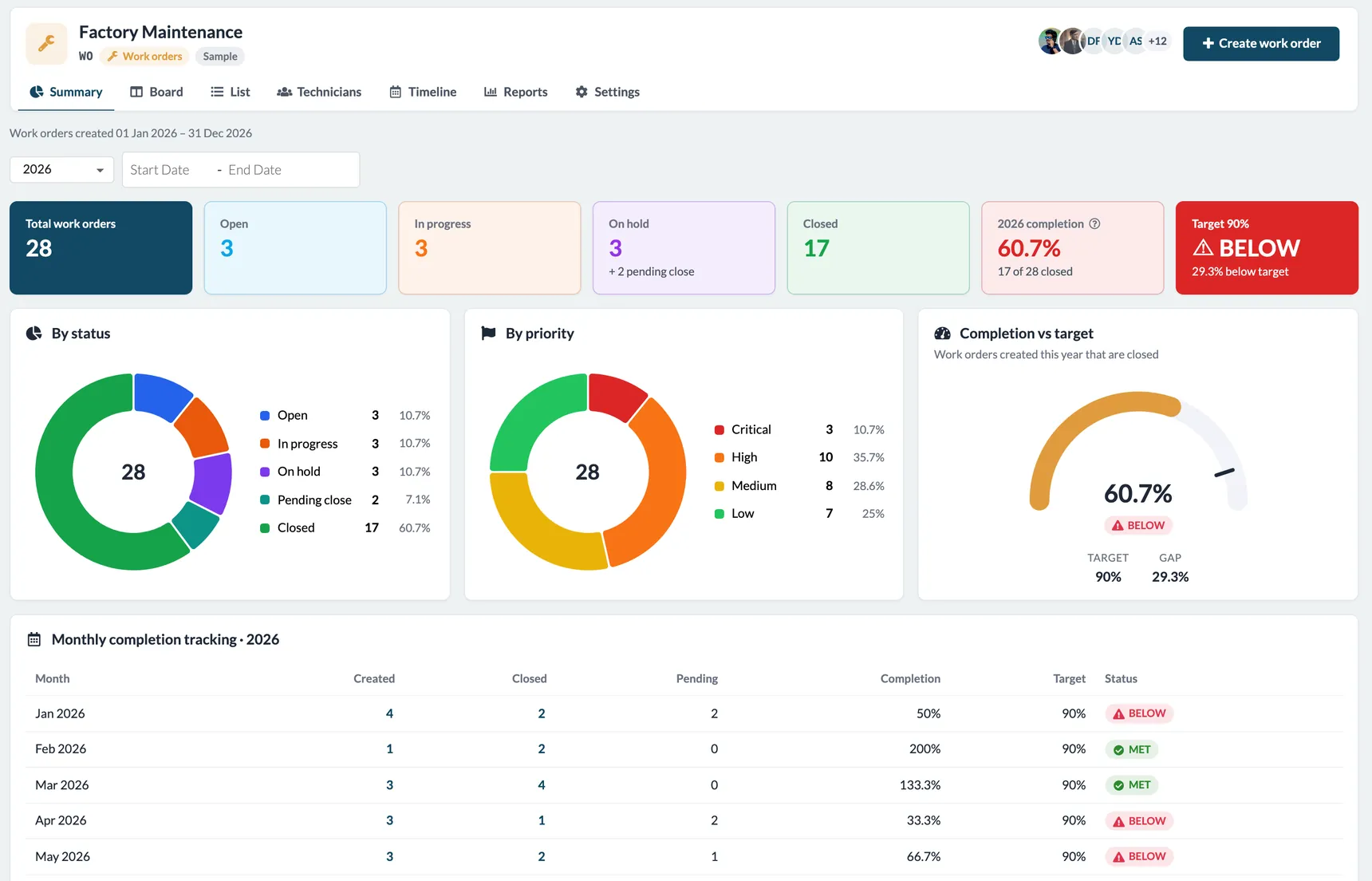
The Technicians tab keeps a roster with specializations, current workload and availability, so you assign the right person who is actually free. And the Summary dashboard tracks totals by status and priority, a monthly completion table and completion against a 90% target, so maintenance managers know immediately whether they are on track.
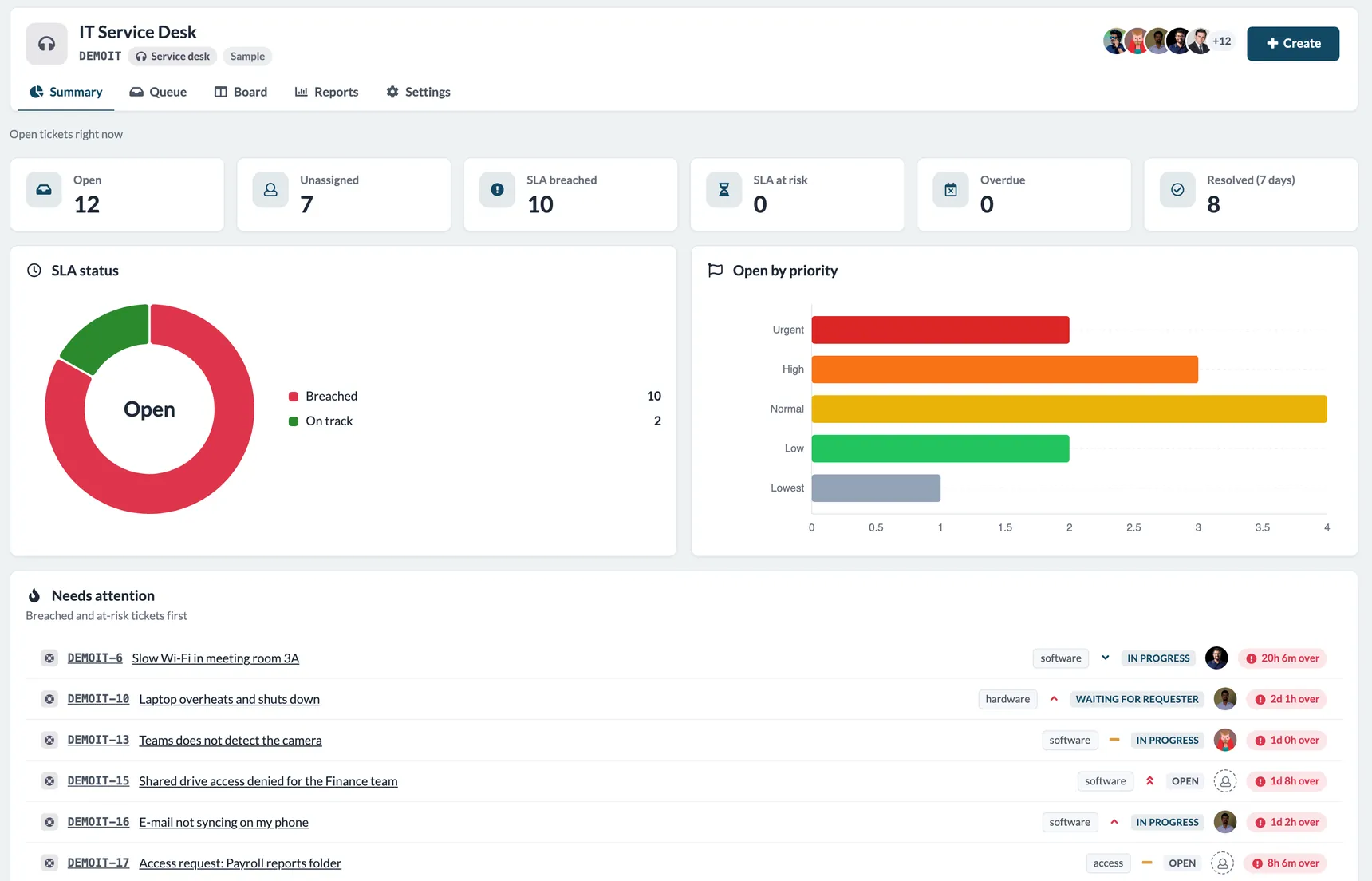
Service desk tickets with SLA and approvals
A Service desk project gives IT, facilities or admin teams a ticket queue with SLA targets per priority. Each ticket shows whether it is on track, at risk, breached or met, and the summary puts breached and at-risk tickets first. Approval rules route requests such as access to a payroll folder to the right approver before anyone acts on them.
Configured per project, not per company
Each project’s admins shape it to the team without touching anyone else’s setup:
- Work types — epics, features, stories, tasks, bugs, sub-tasks, work orders, support tickets, or your own
- Custom workflows — your own statuses and transitions, with rules for which roles may move items where
- Priorities — five levels you can rename, recolor or switch off (for example Critical, High, Medium, Low)
- Item templates — reusable starting points with default sub-tasks and checklists
- Approvals, SLA, custom fields and board columns
A guided setup walks new project admins through each step — people and roles, work types, workflow, priorities, templates, approvals, SLA and board — and shows how far they are until the project is ready.
The right access for every role
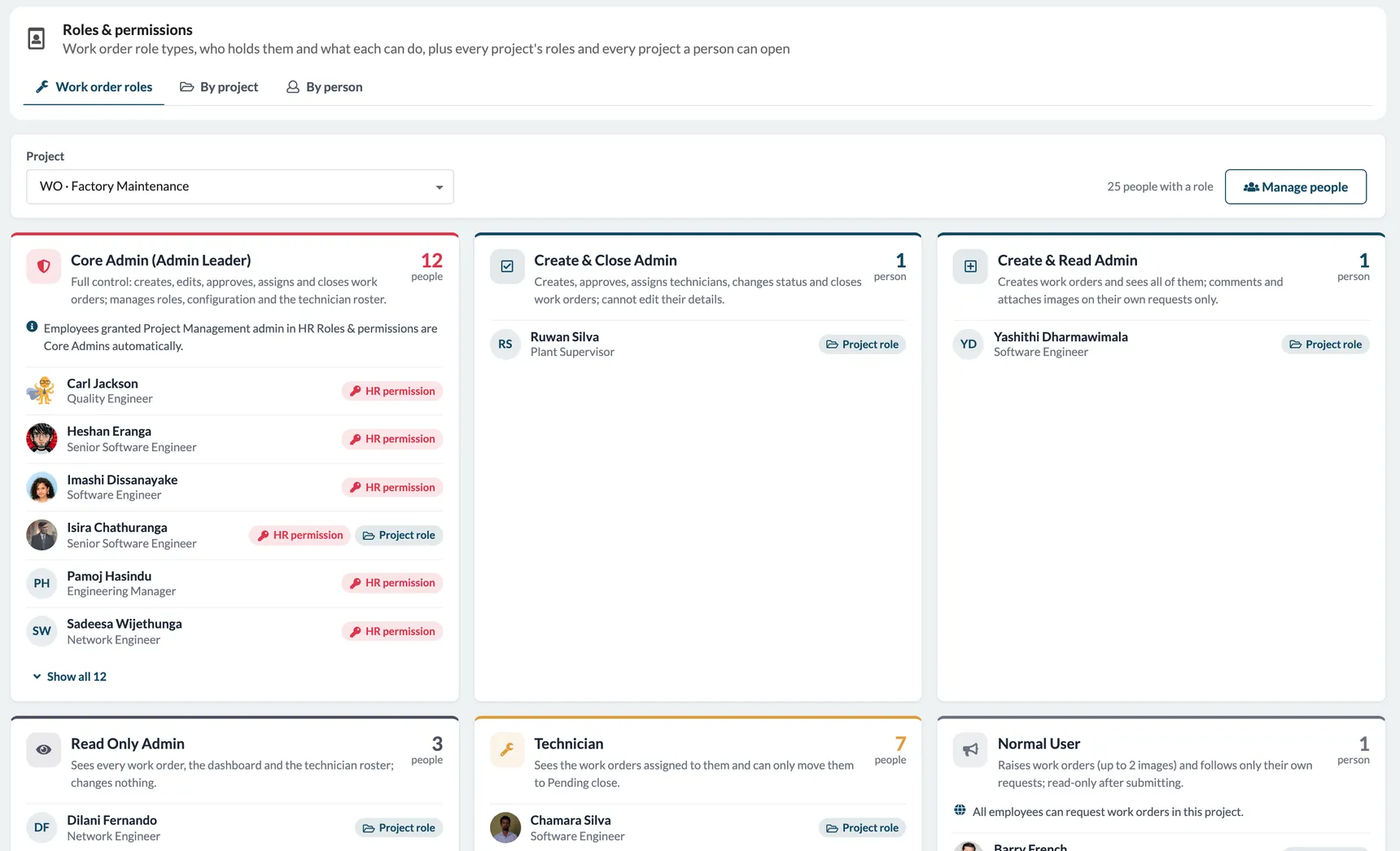
Projects use four simple roles: Admin, Member, Viewer and Reporter (someone who raises requests and follows only their own). Work-order projects add the six role types maintenance teams asked for: Core Admin, Create & Close Admin, Create & Read Admin, Read Only Admin, Technician and Normal User. What each one can do — create, approve, assign, change status, close, comment, attach images — is enforced on the server, not just hidden in the screen.
Instead of adding people one by one, use Eligibility Groups: give a role to everyone who matches a department, designation or location rule, and keep membership in step with your organisation as it changes.
Dashboards with filters that matter
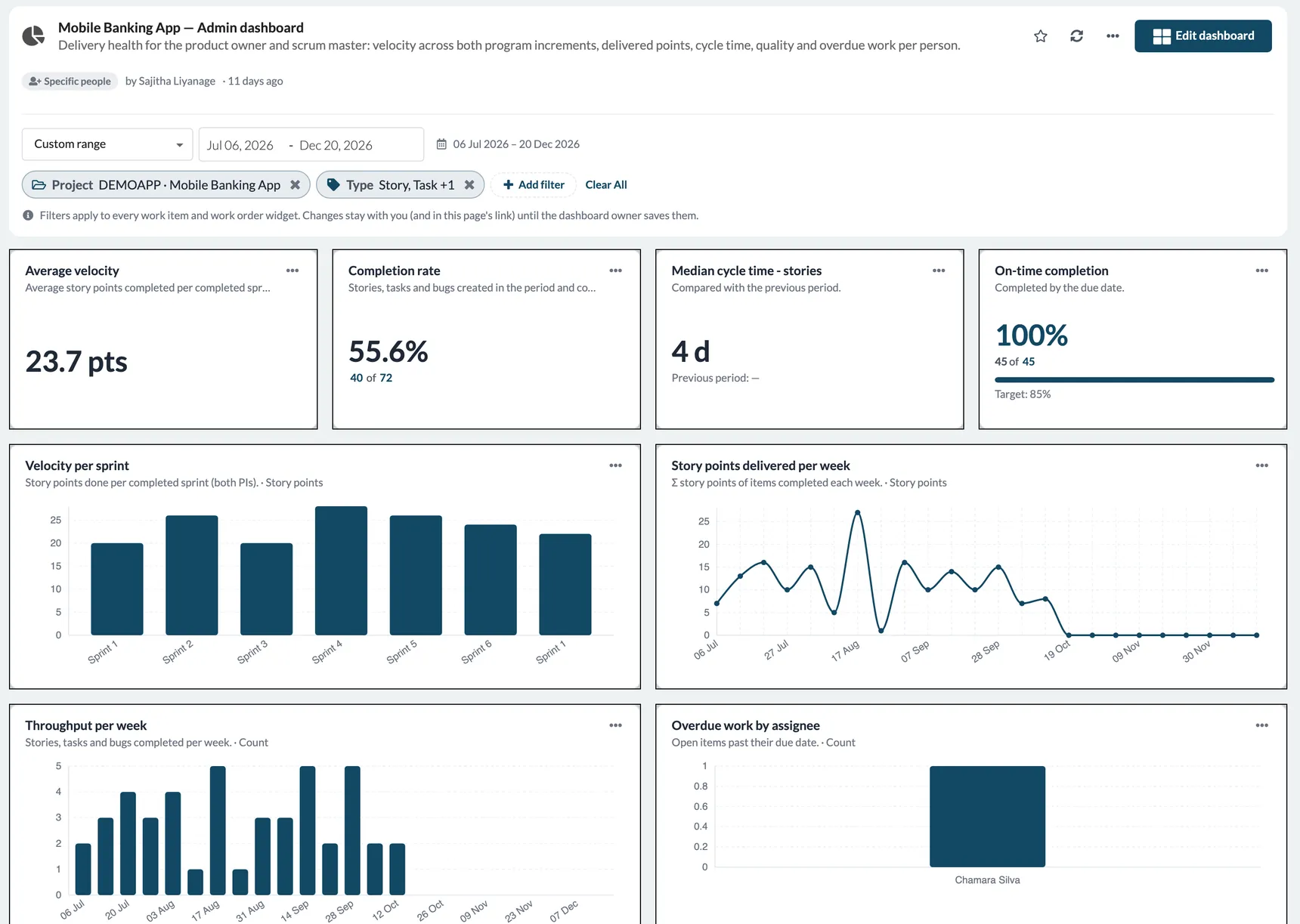
Every employee can build private or shared dashboards from widgets such as velocity per sprint, completion rate, cycle time, on-time completion, throughput and overdue work by person. Dashboard filters combine several conditions — project, type, status, priority, assignee, reporter, sprint or PI, label, due or created dates, SLA state and overdue — and each widget can add its own filters on top.
An admin console for the whole portfolio
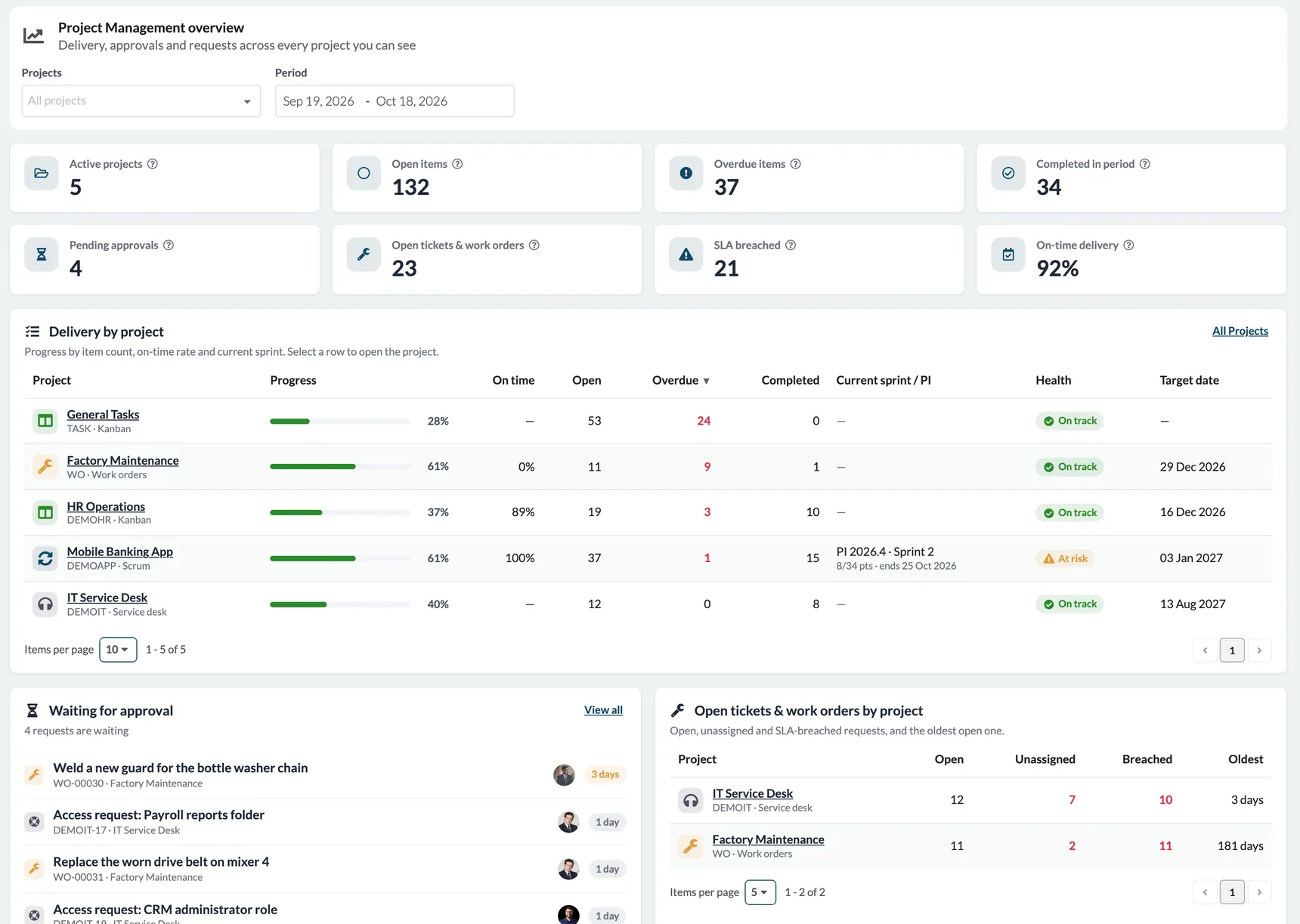
Administrators get a dedicated Project Management console:
- Overview — active projects, open and overdue items, pending approvals, open tickets and work orders, SLA breaches and on-time delivery, plus delivery by project with progress, current sprint and health
- Approvals — every pending request across projects, with bulk approve or reject
- Roles & permissions — who holds which role, by project or by person
- Reports & exports — work items, work orders, time logs, delivery summary and SLA compliance, previewed and exported to Excel or CSV
Friendly for every user
- One home for each person — Your work shows assigned items and approvals waiting for you
- Native to SOFFLIX HR — the same employees, departments and permissions; no separate user sync
- In your language — the full module works in English and Sinhala
Frequently asked questions
Can different teams work in different ways?
Yes. Each project has its own type, workflow, priorities and roles, so engineering can run Scrum while maintenance runs work orders and IT runs a service desk.
Who can raise a work order?
Any employee you allow. A work-order project can let all employees request work, and requesters see only their own orders, which become read-only after they submit.
Can we track maintenance against a target?
Yes. The work-order summary compares closed work orders with a 90% completion target, month by month.
How do we report on work across projects?
The admin console has portfolio KPIs, cross-project approvals and ready-made reports you can export to Excel or CSV.
Get started with Project Management
Project Management is a new module in SOFFLIX HR. Existing customers can talk to their account manager to switch it on. New to SOFFLIX HR? See pricing or get started to see Project Management in action.
Questions? Reach out to us at support@sofflixhr.com.